
Assignment Upload Troubleshooting – Uploading to Box
When users experience difficulty uploading files to Brightspace or Kaltura, we often ask that they upload the files they’re having difficulty with to Box. We do this because Box is a FERPA compliant file sharing platform with high storage capacity. The steps for uploading files to Box and sharing the link with our team are below.
- Navigate to vanderbilt.box.com and log in using SSO
- From the top right, select Upload → File
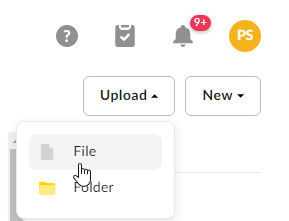
- Select the file from your computer, then wait for it to upload
- Open the file you’d like to share for troubleshooting and select Share in the top right

- Ensure the settings are set to the following:
• Shared link is created – On
• People in your company – can view and download

- Select Copy to copy the document link to your clipboard, then share that link in your reply to the Brightspace Team