
July 2025 Brightspace updates
This July there are several important updates coming to Brightspace. Below are the highlights of this month’s D2L release notes. For a link to the complete list of updates and releases, refer to the references section at the end of this post.
Assignments – Flexible text or file submission options for enhanced student choice
This feature enables instructors to create a new assignment type that accepts submissions in the form of an uploaded file, text entered in Brightspace Editor, or both.
To create this new type of assignment, instructors must go to the New Assignment page, expand the Submission & Completion panel, open the Submission Type dropdown, and select the new File or text submission option.

Figure: The new File or text submission option appears in the Submission Type dropdown on the New Assignment page.
Previously, the available Submission Types were: File submission, Text submission, On paper submission, and Observed in person.
For these assignments, students can choose how they want to demonstrate their learning. For example, if the assignment is an essay, students can upload a file, paste a link to an external file in the text box, or type the entire essay into the text box. Students will also see an expanded Brightspace Editor for text submissions on the assignment submission page.

Figure: The new Submit Assignment page for students, showing the option to submit files and the option to enter text in Brightspace Editor.
Quizzes – Full HTML Editor for Question Feedback
This update introduces the full HTML editor for question-level feedback in Quizzes, enhancing the instructor experience and aligning it with the editors already available for Attempt Feedback and Overall Feedback, including support for the equation editor and file upload features.
Previously, instructors could provide feedback on individual questions using only the inline HTML editor, which offered limited formatting and functionality. With this update, instructors can now:
- Upload files securely
- Insert equations
- Use advanced formatting and media tools

Figure: The question Feedback editor now includes extended options.
Quizzes – Reopen a submitted quiz attempt
Instructors can now reopen the most recently submitted quiz attempt by a student, allowing them to resume from where they left off. The new feature supports scenarios where students run out of time or pass the quiz end date, reducing frustration from auto-submissions and improving overall quiz management flexibility.
Previously, instructors could not reopen a submitted quiz attempt. This update introduces the ability to return quiz attempts to an unsubmitted state and adjust time limits if needed.
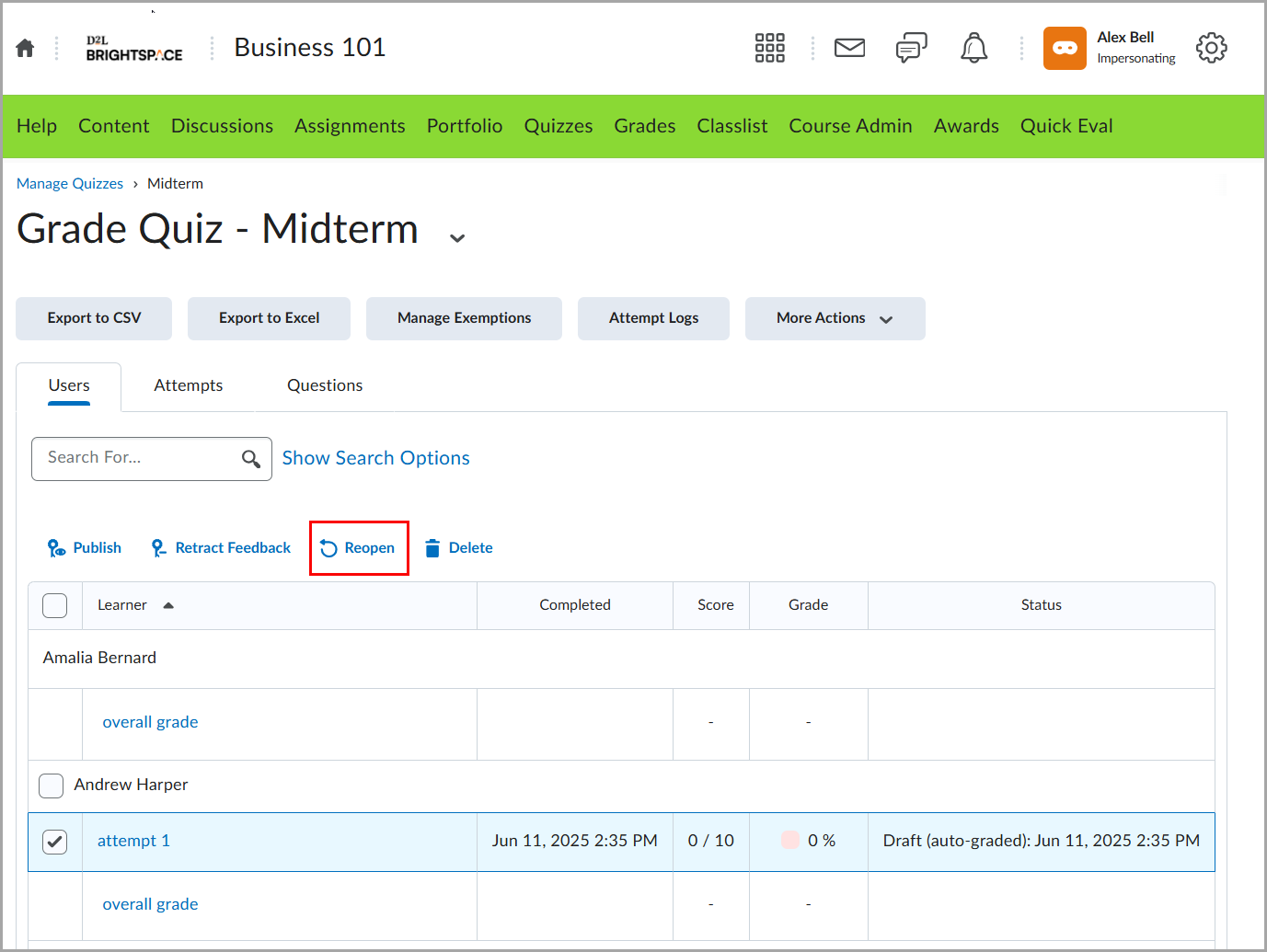
Figure: Reopen a quiz attempt from Manage Quizzes by selecting an attempt and clicking Reopen.

Figure: In the Reopen Quiz Attempt dialog, instructors can add extra time and confirm the reopened attempt.
Leave a Response