
August 2025 Updates to Brightspace
This month, there are several important updates to Brightspace. We are highlighting two of those below: printing quizzes and an update to the Lessons View Content experience. For a list of all updates this month, please refer to the D2L Release Notes linked at the bottom.
Print Quizzes Functionality Added
This month, D2L adds a long requested feature to Brightspace – printing quizzes. With this update, Instructors will be able to select a Print option via the dropdown list of options for each quiz. This will allow Instructors to create different versions of the quiz with shuffled questions, select what formatting options are listed on the quiz, and print an Answer Key. For more information on this update, please review the video below and our new Printing Brightspace Quizzes guide.
Update to Lessons View Display and Student Experience
This month also brings several new updates to the Lessons View formatting of the Content section of any Brightspace course. For more information on what the Lessons View content view is, please refer to our “What is Lessons View?” help page. With this update, the following improvements come to courses with Lessons View enabled:
- Better display of student completion progress
- Students can now track the completion of content topics within a module by viewing a progress indicator next to each topic. This feature brings several improvements to help students easily identify remaining topics in a module. The updates include:
- Check marks for completed items.
- Fractional summary of the learner’s progress for each content module.
- Due dates are now displayed on a single line, with a tooltip appearing on hover for additional details.

- Students can now track the completion of content topics within a module by viewing a progress indicator next to each topic. This feature brings several improvements to help students easily identify remaining topics in a module. The updates include:
- Unlimited levels of depth for content units and and folders
- This allows Instructors or course designers to add as many nested units and folders as they wish to a course. While this does give more freedom to the course design process, we do encourage keeping in mind that more nested units and folders may be more confusing to students.
- This allows Instructors or course designers to add as many nested units and folders as they wish to a course. While this does give more freedom to the course design process, we do encourage keeping in mind that more nested units and folders may be more confusing to students.
- Updated look and feel to Lessons View
- This update brings a new, more condensed view to courses with Lessons View. This allows more text and navigational content to be visible on one page while still keeping the more stylish look and feel found in courses with Lessons View enabled.
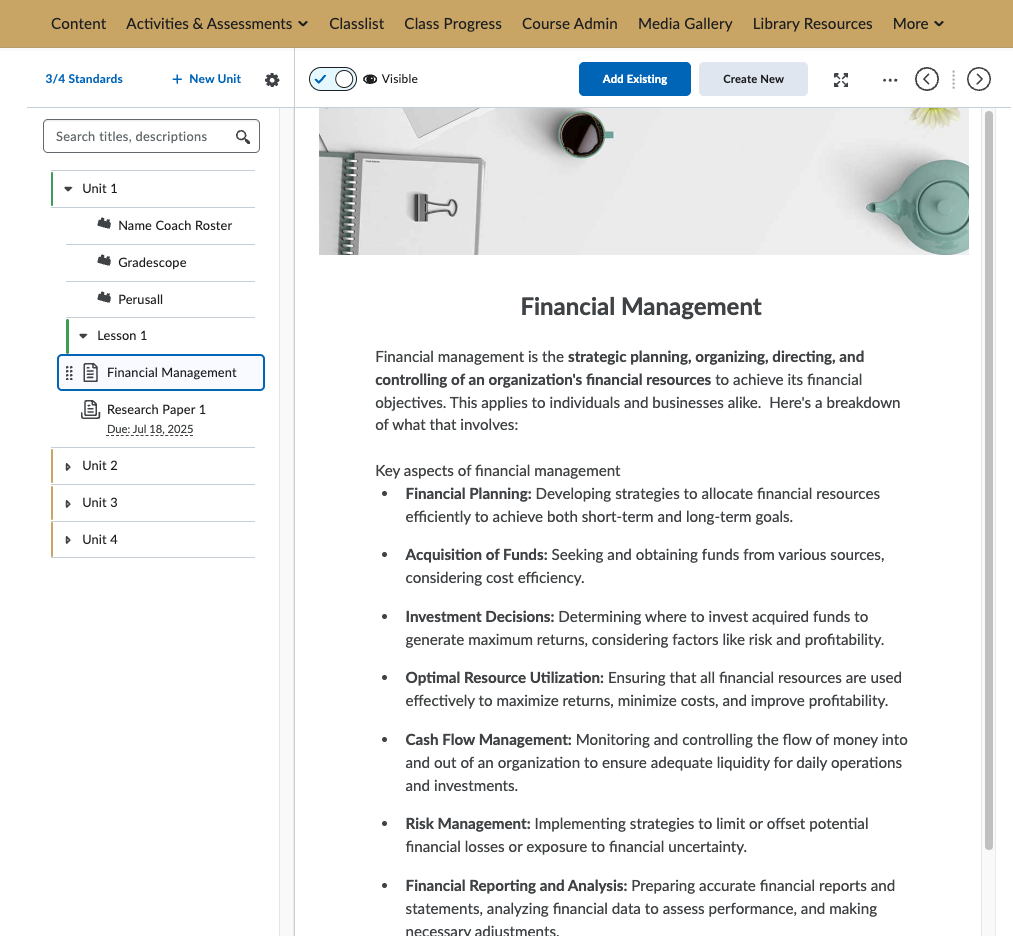
- This update brings a new, more condensed view to courses with Lessons View. This allows more text and navigational content to be visible on one page while still keeping the more stylish look and feel found in courses with Lessons View enabled.
Leave a Response