On-Campus Testing
Student Access provides proctoring services for students who are registered with our office and enrolled in Vanderbilt courses. At the beginning of each semester, students must discuss alternative testing accommodations with instructors. If instructors are unable to provide students with an accessible environment, SA provides a backup location in our Testing Center (Sarratt, 210). Well before the exam date, students will need to confirm where exams will be taken and what the environment will be. Students must make their exam requests at least 3 business days in advance.
Students not registered with Student Access
Unfortunately, Student Access is not able to proctor exams, quizzes, midterms, or finals for students that are not registered with our office. Please refer any student requesting exam accommodations to our instructions for registering with the Student Access Office.
Online Testing
Student Access is only able to proctor exams in our Testing Center. However, this does not mean that instructors are obligated to provide the option of online testing to any student. If an instructor routinely utilizes remote examination techniques, it will be the responsibility of the instructor to ensure that the exam is accessible and accommodations are met. As stated above, Student Access is only able to proctor exams physically taken in our Testing Center.
If your students receive stop-the-clock breaks, you can build in the appropriate amount of time while setting up Special Access in Brightspace.
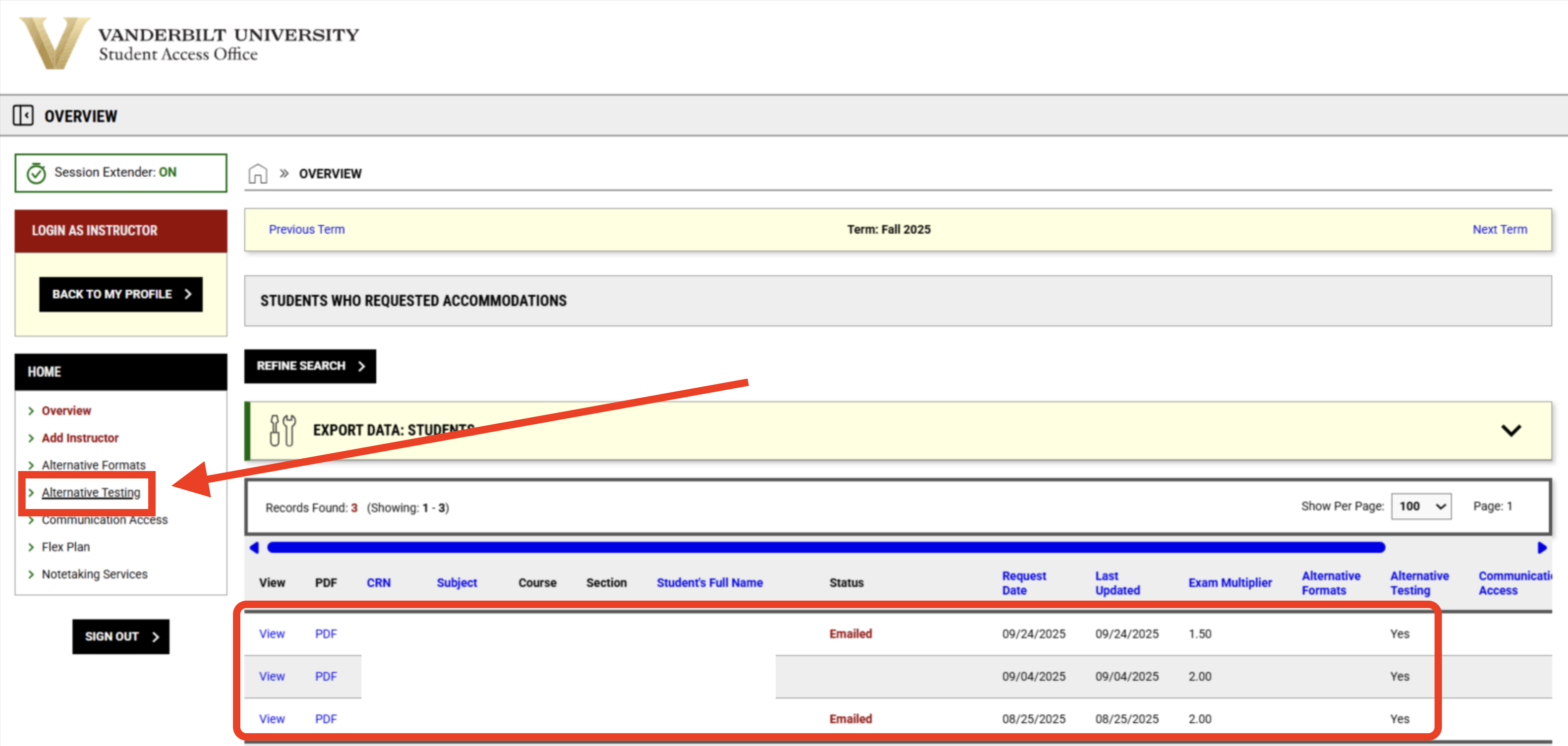
If you're not sure which of your students have testing accommodations, we have posted step-by-step instructions for exporting a list of your students' accommodations.
For further information on setting up digital accessibility in your courses and exams, refer to our Instructional Accessibility pages.
The Testing Agreement
Sub-Sections
- Completing the Testing Agreement
- Reviewing / Updating the Testing Agreement
- Copying the Testing Agreement
The Testing Agreement is a short set of questions that need to be completed before Student Access can proctor exams. We strive to proctor in a comparable manner to the exams administered in class, and the information you provide helps us to do that.
The Testing Agreement only needs to be completed once per semester, and if you have multiple students or you teach multiple sections/courses, the agreement can be copied. As well, you can review or update the Testing Agreement at any point in the semester.
Completing the Testing Agreement
Starting from your Instructor Portal home page, scroll down to the bottom and select CONTINUE TO VIEW STUDENT ACCOMMODATIONS.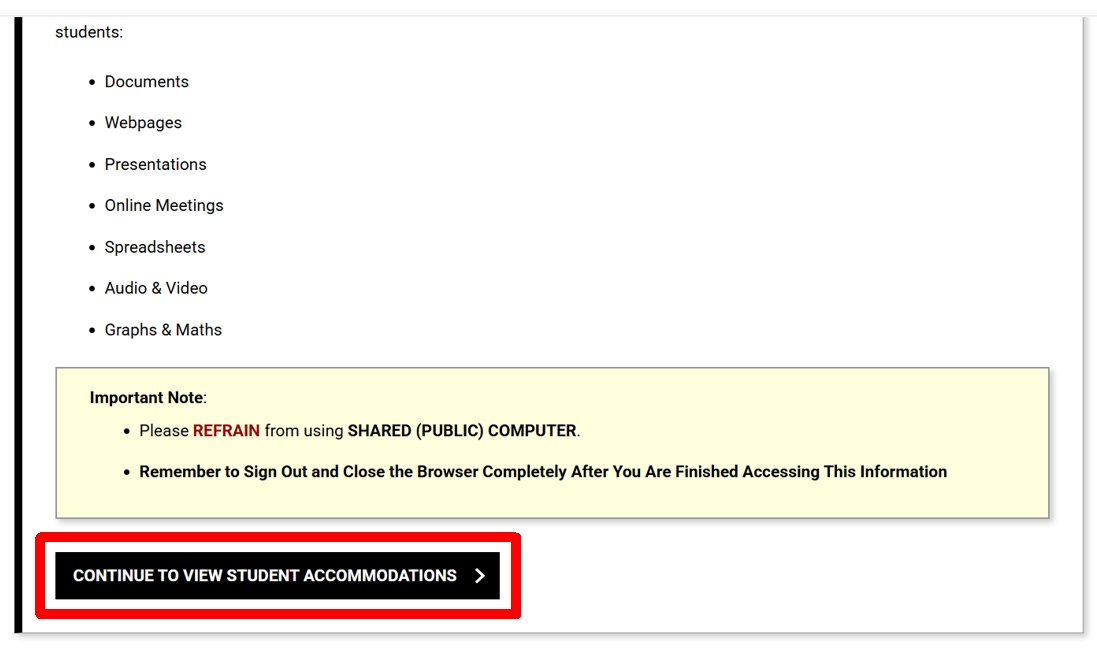
Next, select the Alternative Testing on the left side of the Commodore Access Portal: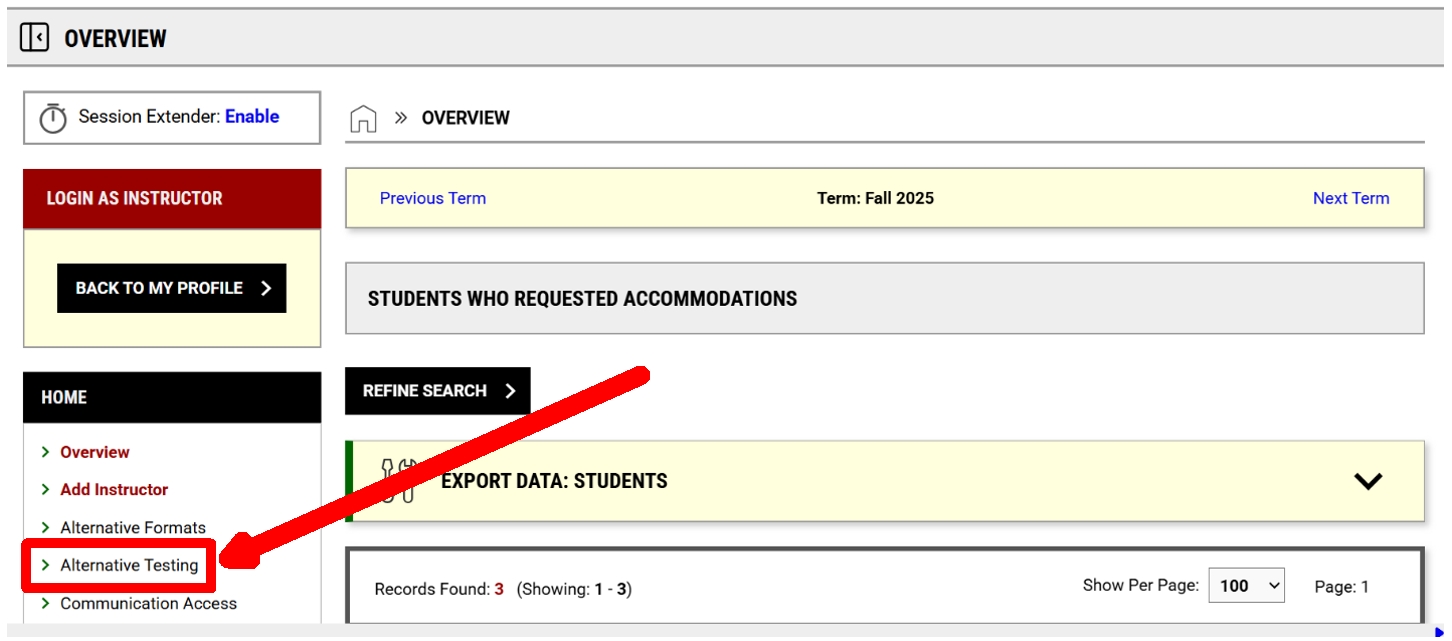
This will land you on the “UPCOMING EXAMS” page.
Select “ALTERNATIVE TESTING AGREEMENT” from the menu near the top of the page.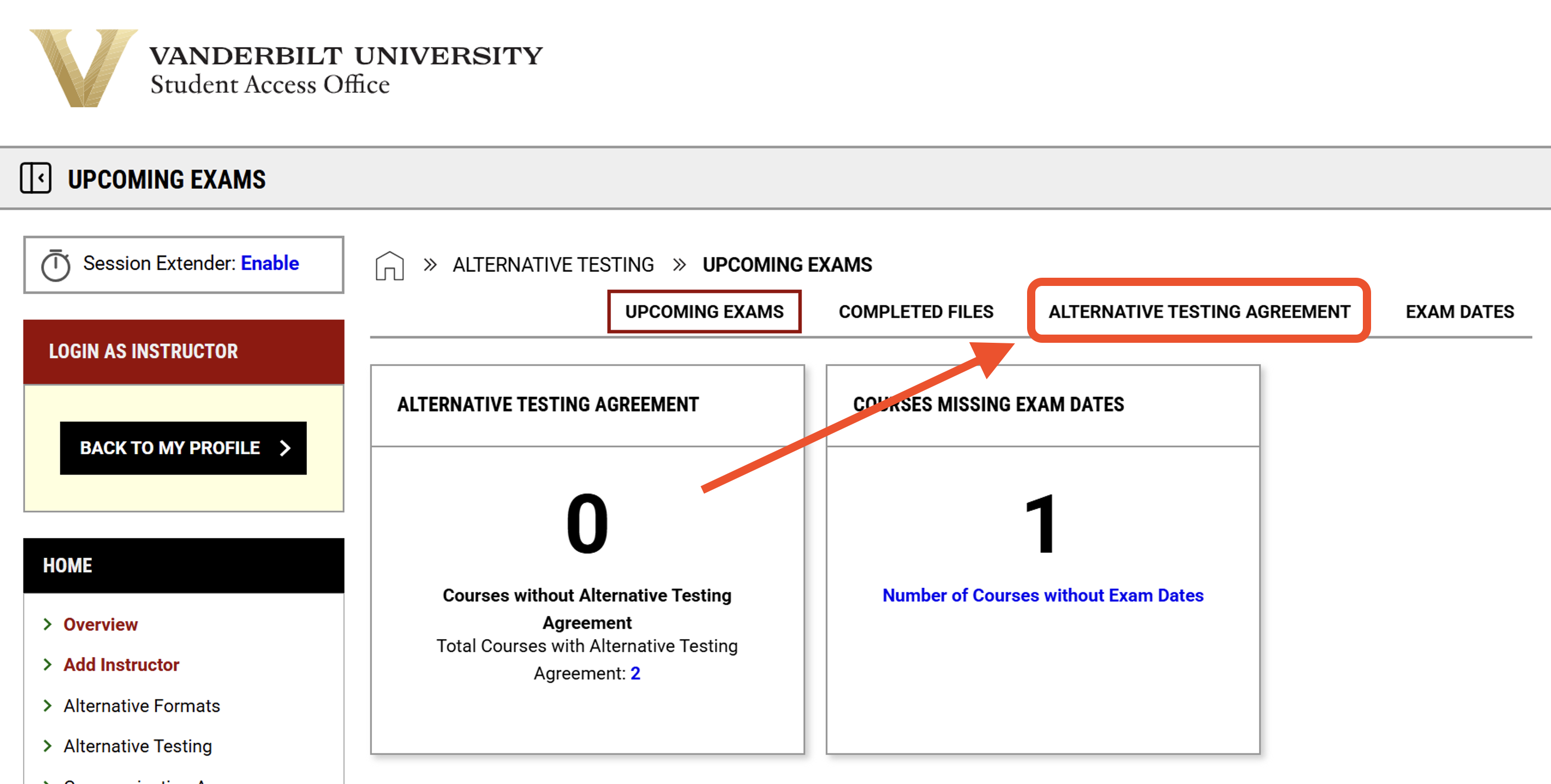
On the Alternative Testing Agreement page, you can use the "Navigate to" drop-down menu to select your:
- Exams scheduled without Alternative Testing Agreement
- Courses without Alternative Testing Agreements
- Courses with Alternative Testing Agreements
- Courses without exam dates Specified.
Select “Courses without Alternative Testing Agreements” if you plan to have your students take their exams in the Student Access Proctoring Center.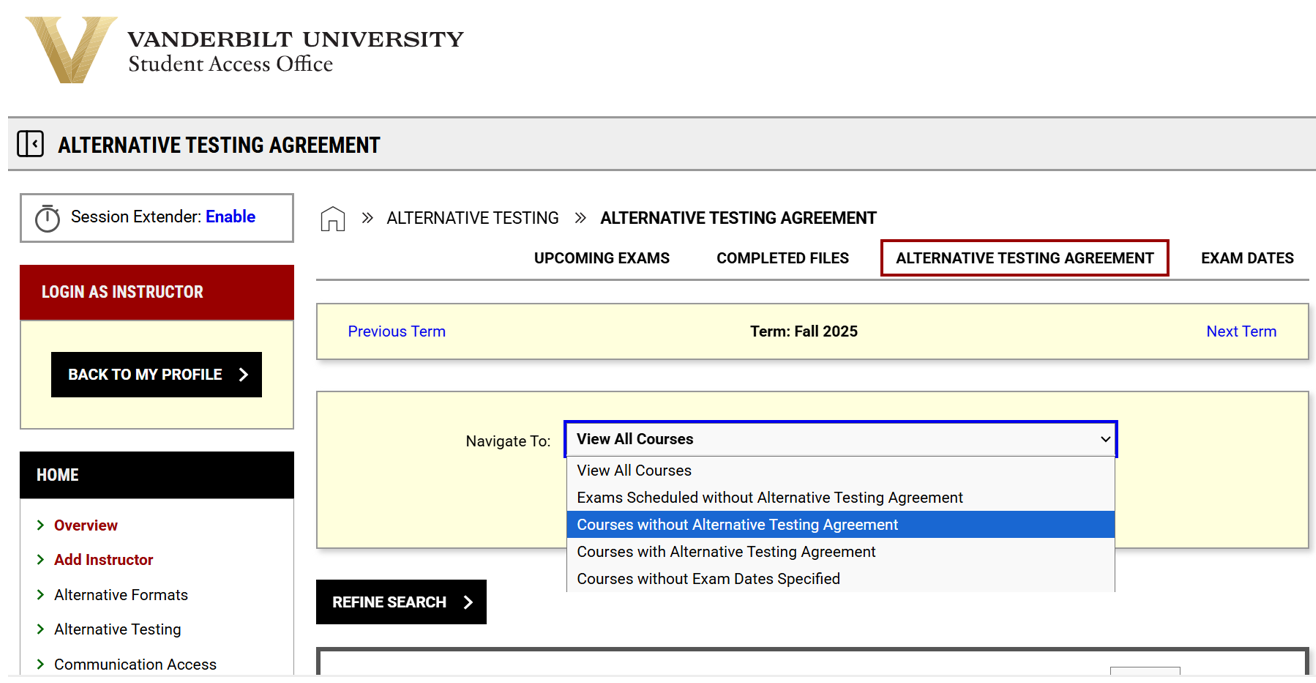
Select the “Specify" link for the course that needs a testing agreement: 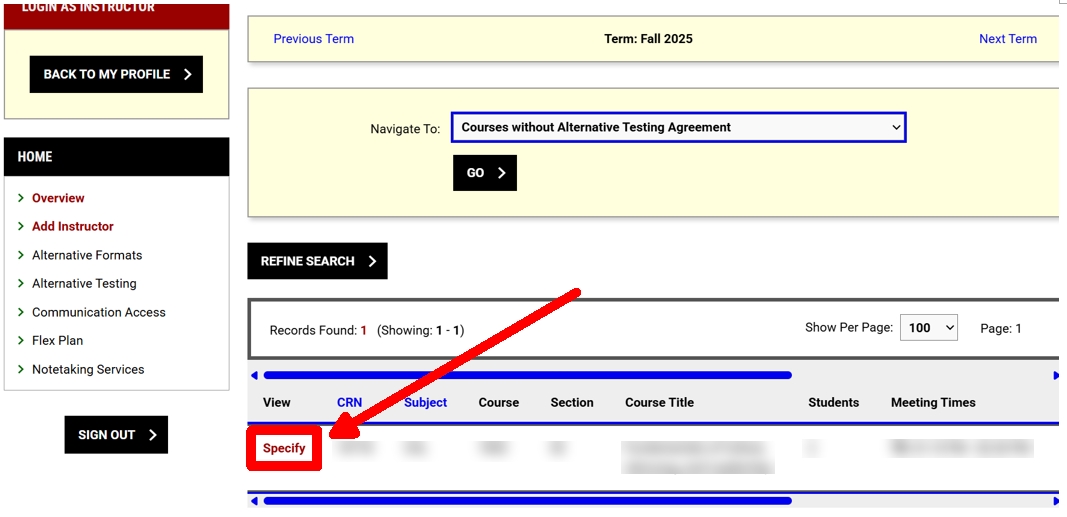
If you plan to provide an accessible testing environment in accordance with the requested accommodations or if your course doesn’t have exams, you can use the exam management method here. Choose the appropriate selection from the drop down menu. Select “Confirm to Proceed”. Then, select “SUBMIT YOUR SELECTION”.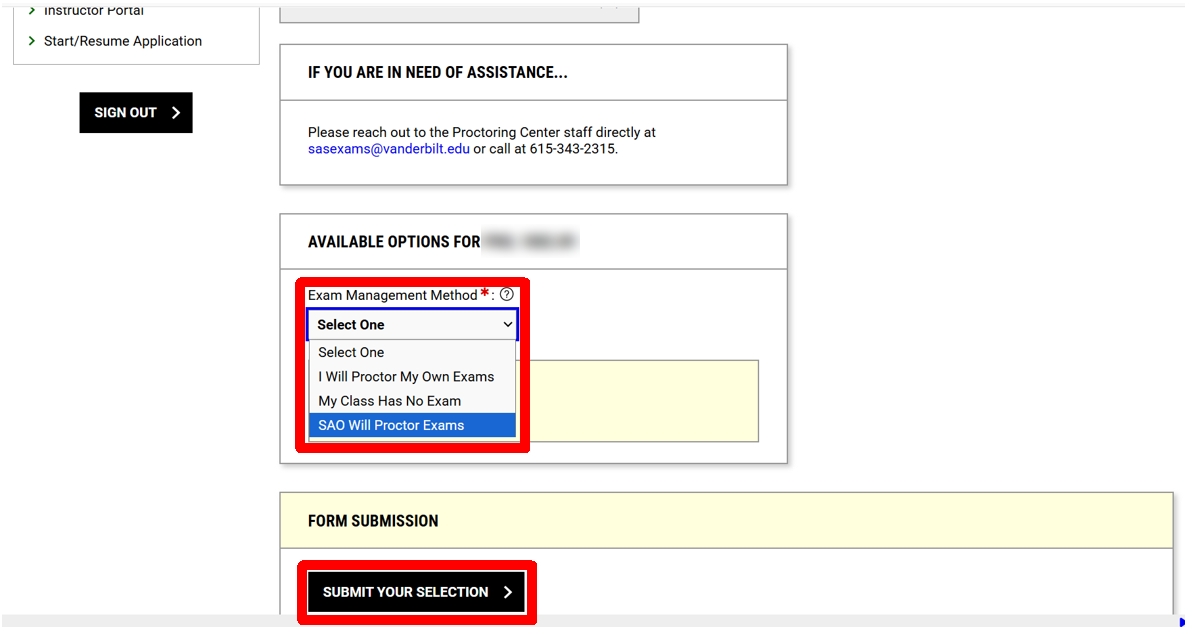
If SAO will proctor your exams, scroll through and answer the questions on the Alternative Testing Agreement for your Course and Section.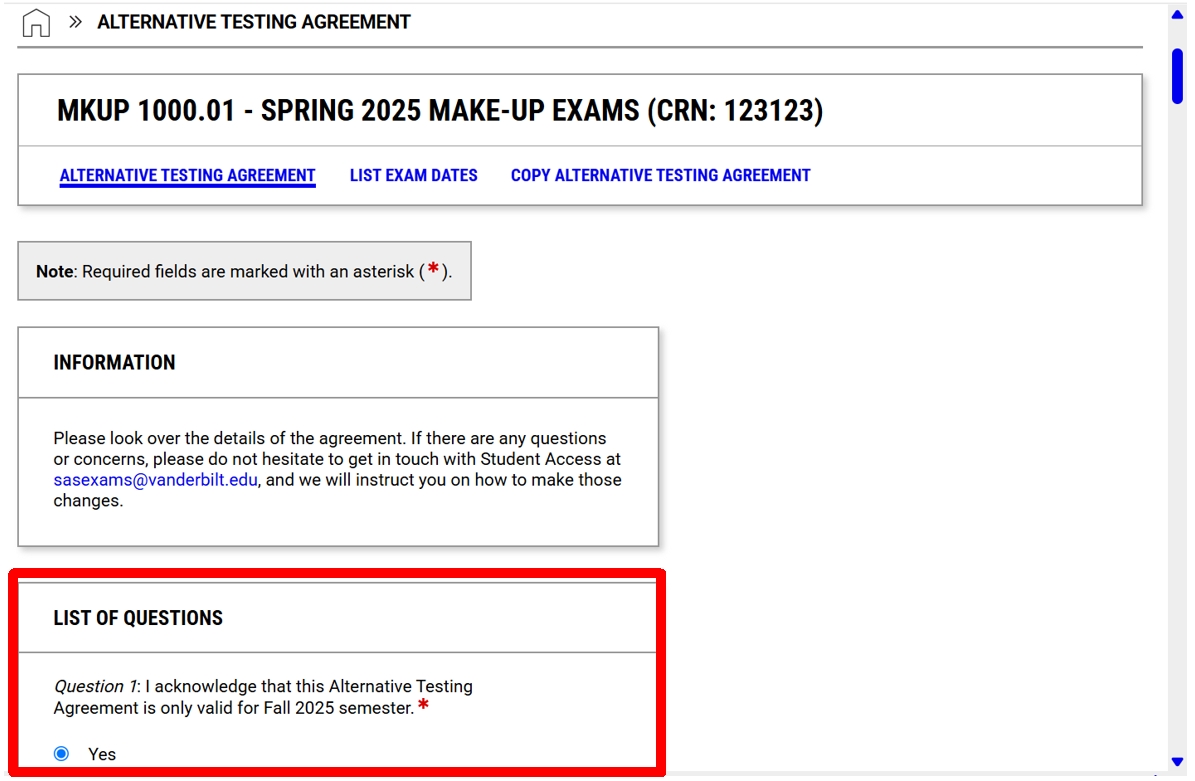
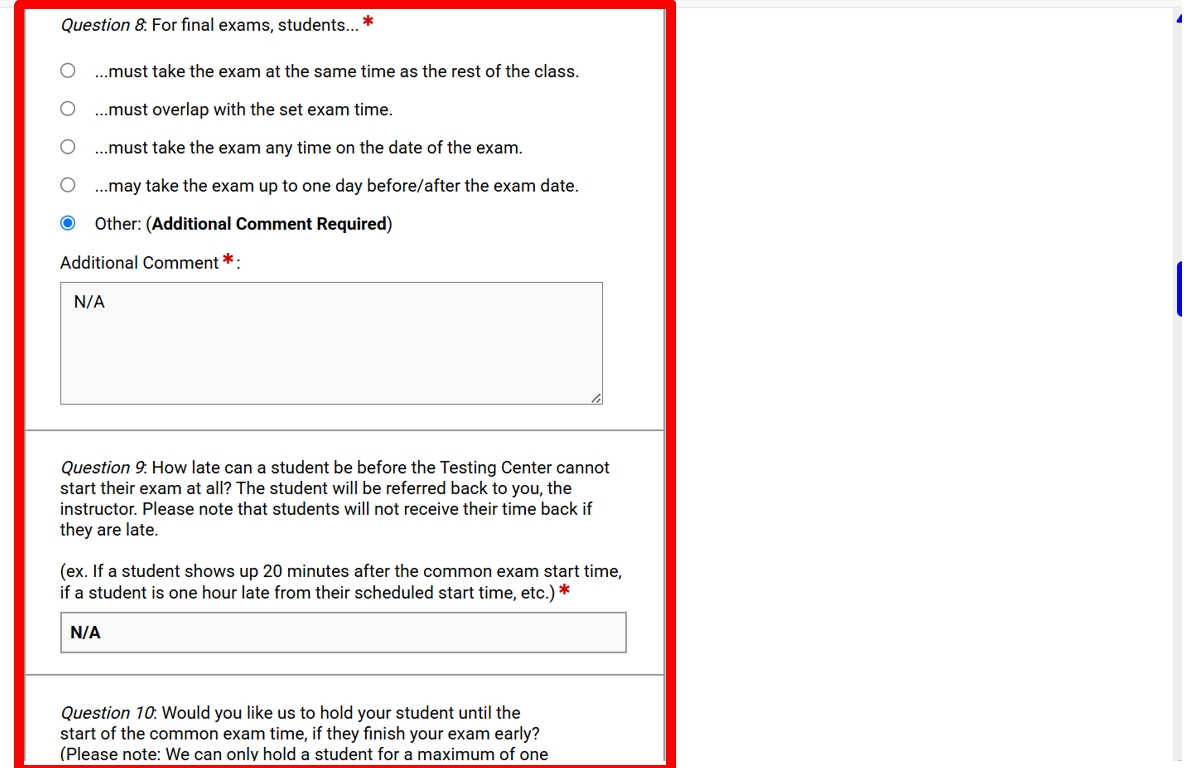
Press “SUBMIT AND CONTINUE TO SPECIFY EXAM DATES”.
Enter your exam dates for the semester. Then, submit the form. If you have more than one section, we can copy the testing agreement for you. Email SASEXAMS@vanderbilt.edu and give us your course names and sections for this option.
Email Notification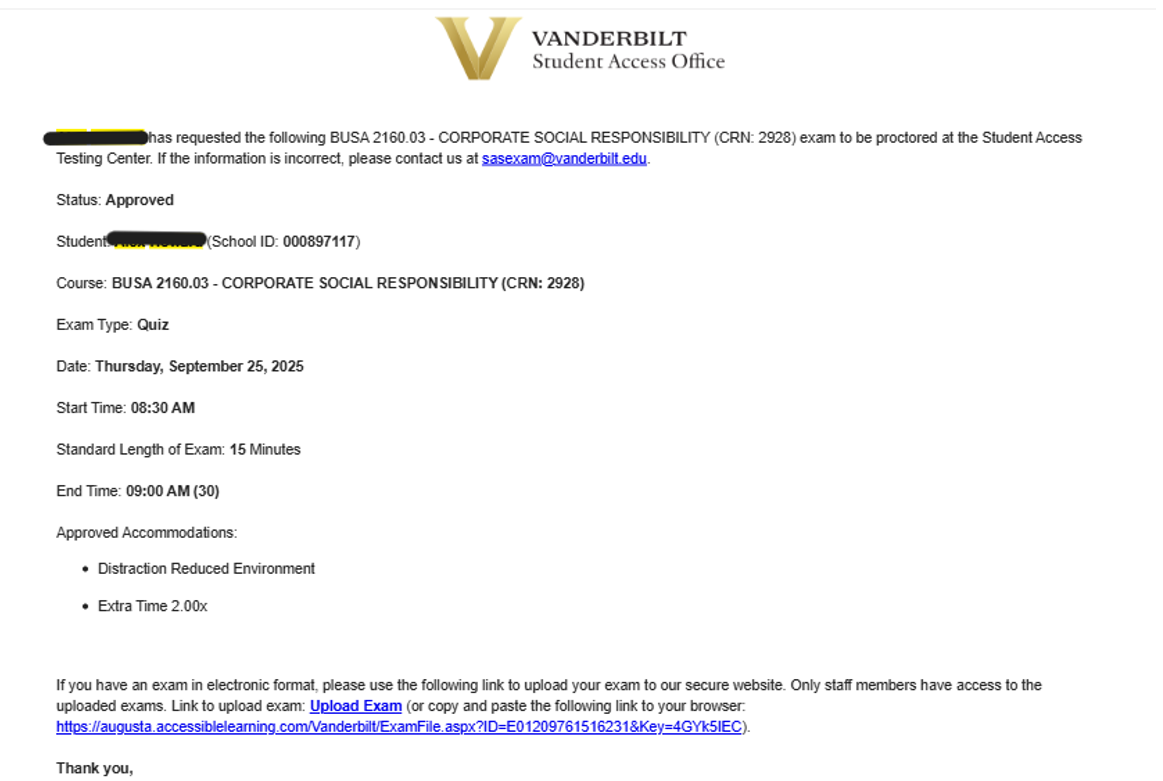
Copying the Testing Agreement
- Under the Alternative Testing page, in the top right corner, click Alternative Testing Agreement.
- You should see a list of your courses. By the course's Testing Agreement you'd like to review or update, click View.
- Make any changes as necessary, then click Update and View Exam Dates. That is all you need to do, unless you also need to fix exam dates. If so, then you will see Modify by the exam dates listed.
Please note: If you teach a class with multiple sections, you will need to change the Agreement for each section.
To change exam dates without modifying the Testing Agreement, then follow these instructions:
- Under the Alternative Testing page, in the top right corner, click Exam Dates.
- It will pull up a list of all exam dates for each class - you can Modify it as necessary.
Reviewing / Updating the Testing Agreement
- Under the Alternative Testing page, in the top right corner, click Alternative Testing Agreement.
- It should pull up a list of all your classes, with a blue Copy next to each class's that has had a Testing Agreement filled out.
- Click Copy, then select the courses you want to copy that Testing Agreement over to. You will also have the choice to select exam dates previously inputted. If they are right, then you can select those dates. If not, you will need to re-input dates manually.
Exam Delivery & Exam Return
Sub-Sections
Viewing Approved Exams
- Log into the Commodore Access Portal with your VUNETID and password.
- Click Continue to View Student Accommodations.
- Then, click Alternative Testing in the left menu, and it should pull up a list of all your students who have scheduled exams in the Proctoring Center.
Uploading / Deleting Exam Files
- On the Alternative Testing page, in that same list of all students who have scheduled exams with our office (Upcoming Exams), you have the option to manually select the scheduled exams that you want to upload an exam for.
- Select the applicable students, then scroll down to Step 2: Select Available Options - Upcoming Exam File Upload.
- Upload the file there, then click Upload File.
- If you upload the wrong file or want to update the previously submitted file, back up under the list of Upcoming Exams, you can click View File.
- Click Delete Exam File, then confirm.
- Then follow the previous instructions on uploading an exam file.
Downloading Completed Exams
- On the Alternative Testing page, in the top right corner, click Completed Files.
- Click Authenticate by the exam you want to download. This will send a NEW email to your inbox with a six-digit code.
- Input that code, then click Authenticate.
- You will be able to freely download exams for about 20 minutes.
Make-up Exams
If students need to make up an exam for any reason, they must contact their instructor. Once they have confirmed a new date and time with their instructor, they can make an exam request on the Commodore Access Portal. Please note that make-up exams at Student Access can only be requested by students that are registered with our office. Students who are not registered with Student Access must make arrangements with their instructor.
Final Exams
Student Access has adjusted our final exam schedule to better align with the university's final exam schedule. Final exams at SA can be requested for 9 AM, 12 PM, 3 PM, and 6 PM. In addition, we have extended our Testing Center hours during the final exam period (8 AM to 10 PM). As a reminder, we have limited seating, and seats are available on a first-come, first-served basis.
To ensure we have adequate testing space, we are asking all students to make their exam requests before 4:30 PM on Wednesday, November 26. If a student needs to make a late request for a final exam, they can make the request using the Late Exam Request Form. If there is a late exam request, we cannot guarantee that we will be able to approve the date and time requested, due to limited testing space and the time of the request.
Please remember to review your Testing Agreement(s) before the final exam period. If the amount of time students receive for a final exam is not entered on the Testing Agreement, we will assume your student(s) will have the default amount of time to complete the exam. Also, when you log onto the Commodore Access Portal and select “Alternative Testing” located on the left toolbar, and scroll down, you can see a list of students who have been approved for their upcoming exams at our Testing Center.