What is Phishing?
More than 90% of cyber attacks begin with phishing according to the Cybersecurity and Infrastructure Security Agency (CISA). Anyone can be a victim. Phishing is the attempt to steal information by pretending to be someone you know and trust. The attacker on the other end is after your information (password or credit card #), or trying to install malicious software such as ransomware, remotely access trojans (RATs), viruses, etc. to gain access to your organization's network.
Always check the sender's address and hover over links before clicking. Never send sensitive personal information in an email (e.g., passwords, social security numbers, credit card numbers). And most importantly, SLOW DOWN and consider if the email makes sense.
Here are some common phishing techniques:
| Spear Phishing | Smishing | Vishing | Quishing |
An email that targets specific individuals or job titles. Attackers personalize the attack to increase success. | A text message that entices a victim into revealing personal information via a link that leads to a phishing website. | Phone calls that ask the user to reveal personal information over the phone, mostly done with a fake caller ID. | A QR code that redirects the user to visiting malicious sites or downloading malicious content. |
There is no single red flag that guarantees an email is phishing or legitimate. For example, not every email from an external sender is bad, nor is every email from an internal address good. But in general, here are some signs that should tell you to slow down and consider things more closely:
Suspicious Sender
- Sender is not someone that you know
- Sender's email address has,
- spelling errors (Goggle.com)
- added/changed characters (Micros0ft.com)
- suspicious domain name (@vanderbilt.edu.gmail.com)
Message Content
- Greeting or closing is generic or missing, such as saying Dear Sir or Madam
- Subject does not match the message content
- It is a reply to a message that you did not send
- Message requests,
- immediate action (reply ASAP)
- submission of personal information or asks yo to update your account
- Includes frequent spelling, grammar, or punctuation errors
Suspicious Links and Attachments
- URL,
- leads to a site that is different from what is advertised
- has a strange domain (.ie, .ml, .ne, .ru)
- Attachment has an unexpected file type extension (.html, .exe, .vbs, .scr, .cmd, .js)
- Link or attachment names include misspellings or added/changed characters
Common Attacker Tactics
- Offers a job that seems too good to be true
- Prompts to update your account information or change your password
- Requests money or gift cards
If you suspect an email is phishing, please report it to the Office of Cybersecurity by one of two methods:
- Using the Outlook email client, select the “Phish Alert” button in the ribbon at the top.


- If you are not using Outlook, or the button is not available in your version, please send the phishing email (as an attachment) to phishing@vanderbilt.edu.
The cybersecurity team will investigate the message and quickly respond to you whether it is malicious or not. If it is malicious, delete the email; do not respond. If you have any questions, email them to phishing@vanderbilt.edu, or contact VUIT Support at 615-343-9999.
SECOND CHANCE
is an optional email security tool for Outlook and Microsoft 365 that gives users a second chance to avoid phishing attacks. It can help add another layer of protection, especially from accidental clicks, potentially preventing you from visiting an unsafe or unknown website. Provided by our partners, KnowBe4, this email tool is available to Vanderbilt employees.
Features:
- pop-up window prompt to "proceed" or "abort" after you click a link
- URL decoder that reveals the original link that can be rewritten or hidden by Safe Links
It is not installed by default on Vanderbilt devices, but is optionally available to VU employees with interest. You must have a Windows computer. It is not currently supported on mobile devices or macOS/iOS.
Click the button below to access the tool.
See this short video from KnowBe4 that explains how Second Chance works. Contact it.risk@vanderbilt.edu learn more!
I Accidentally Clicked. Now What?
If you accidentally click on a malicious link or attachment, immediately report it as an incident to the Office of Cybersecurity. You should also reset your Vanderbilt password.
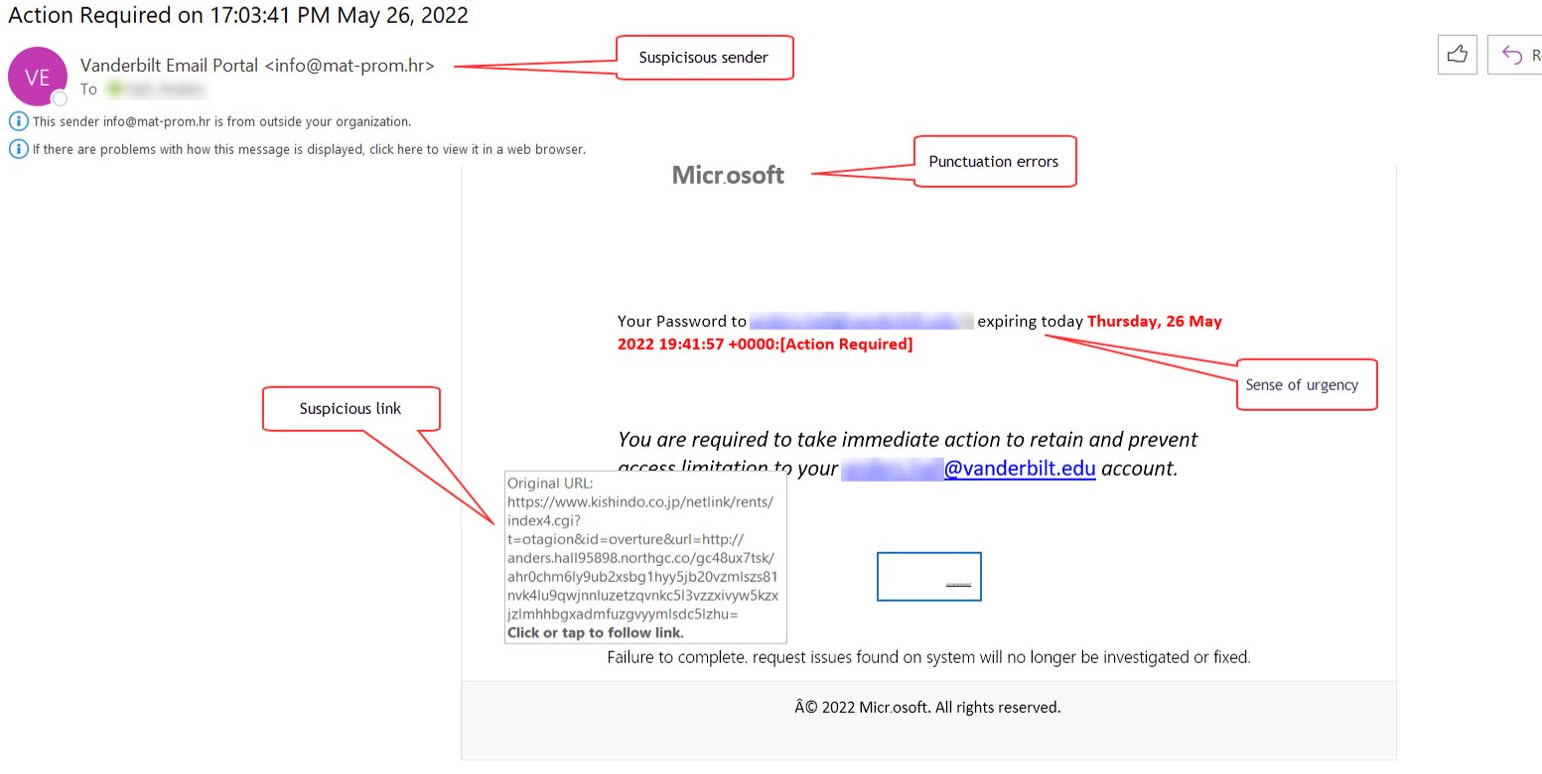
- This email message was received at Vanderbilt and was malicious. The link lead to a site that is not hosted at Vanderbilt.
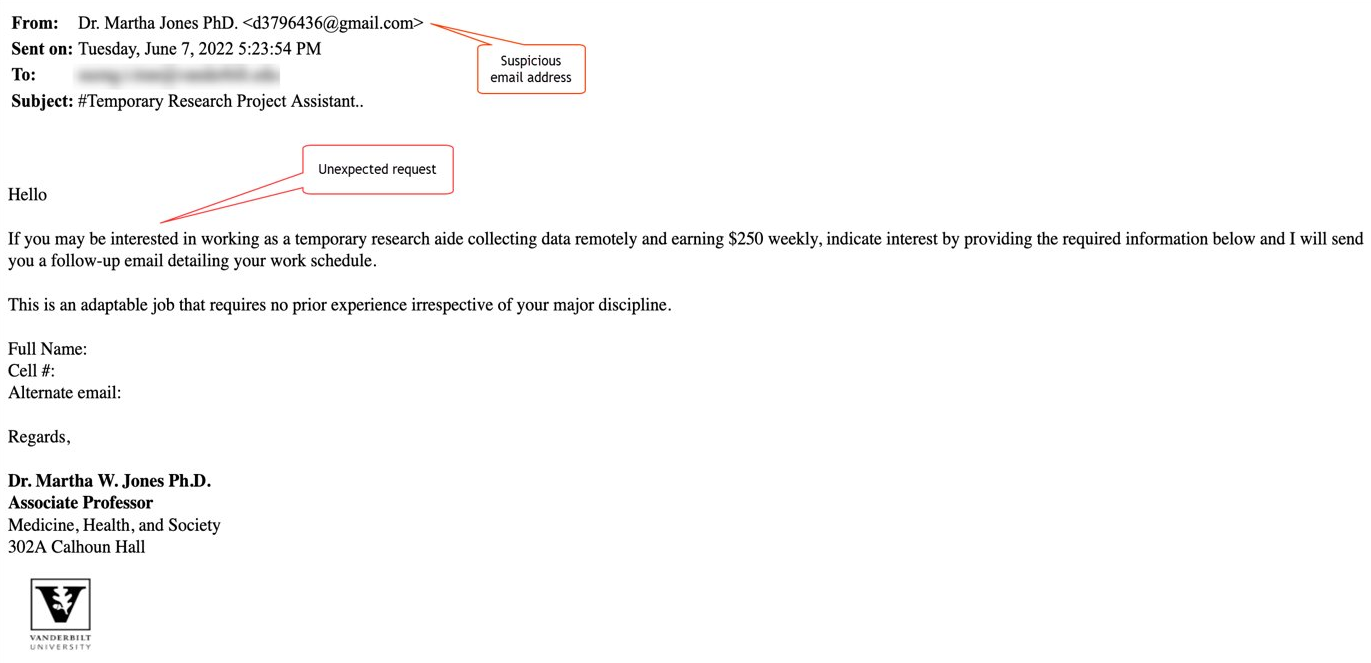
- This was also received at Vanderbilt and was malicious. It impersonated a VU employee to extract sensitive information from the recipient.

Not sure how to start?
Get in touch if you don’t know where to begin, you can’t find the guidance needed on the website, or if you just want to learn more. The Office of Cybersecurity has subject matter expertise and is here for Vanderbilt community to discuss security questions or concerns.