Adversary-in-the-Middle (AiTM) Smishing Attack
August 25, 2026
What is it?
Adversary-in-the-Middle (AiTM) Smishing is a sophisticated text message scam where cybercriminals trick people into clicking a link in a text message and going to a fake website that looks legitimate. The attacker secretly positions themselves between the user and the real website, allowing them to capture session tokens and steal data.
There are reports that this attack has occurred against VU employees where the smishing text message purports to be from Vanderbilt "HR".
How does it work?
- You receive initial contact via text message with a malicious link impersonating a trusted source.

Example smish text message - Clicking the link leads to a phishing page.
- The attacker steals your valid session token and replays it in their own browser.
- Session hijacking occurs (or token theft) allowing the attacker to bypass traditional password login and MFA, avoid security detection tools, and maintain ongoing active access, enabling data theft.
How to protect yourself
Look for red flags in text messages the same as you would in email. Visit the Office of Cybersecurity's Phishing Guidance for red flag examples.
If you accidentally click, change your VUNet ID password. Report anything suspicious to Cybersecurity.
ClickFix Attack
August 5, 2025
What is it?
ClickFix is a sophisticated tactic used by attackers to trick you into running malicious code on your computer. It is a social engineering technique that uses pop-up boxes containing fake error messages with instructions on how to "fix" the problem. If you follow the instructions and click the button / copy the code, it bypasses defenses and infects your computer, giving the attacker access.
This tactic has been observed at Vanderbilt.
How does it work?
- Associated with websites that are compromised or phony (unbeknownst to you)
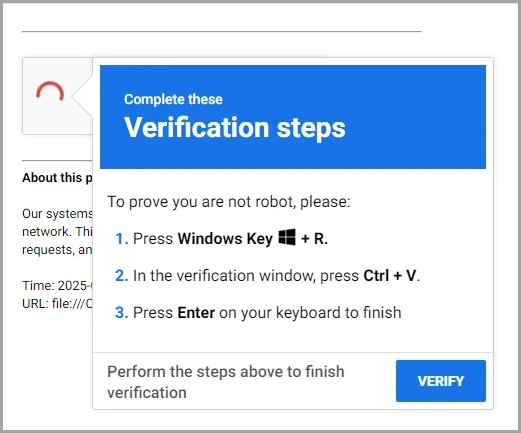
Example ClickFix pop up - Uses a pop-up box with a fake error message
- Instructs you to:
- Click "Fix it"
- Verify "I am not a robot"
- Press Windows + R
- Automatically copies, or asks you to manually copy, code into your computer terminal
- Your computer runs that code and installs malware
How to protect yourself
Be aware that VUIT will never ask you to run code by yourself to troubleshoot a problem. Never copy prompts or code into Windows Run or PowerShell unless you fully understand what the code does.
If you see this prompt, close your browser immediately. Report it to Cybersecurity and change the password for your VUNet ID .