Accessible Texts Processes
If you have been approved to receive alternative formats, you can follow these steps to search for and request books. You can also use the Custom Request form to request alternative formats of any other class materials.
Searching for accessible texts
- We recommend that you start by searching Bookshare.org. If found, you can get a digital copy without having to purchase the book at all. Bookshare's catalog is free to anyone with a print disability. If Bookshare has your book, you can select that book in the Commodore Access Portal, and we will get you access to it under our institutional Bookshare account.
- You can also check VitalSource or RedShelf because they purport to be accessible textbook vendors. If found there, we recommend that you rent or purchase your books through these services, rather than renting or purchasing through the VU Bookstore.
- When you cannot find an accessible copy through any of the vendors mentioned above, our office will help you get a copy that works with your access needs. This can include Braille, large print, tactile images, PDF, ePub, or any other format that's necessary.
- In order for us to abide by copyright law, you'll need to prove that you have a copy of any books or course materials in order for us to be able to give you a digital copy. See instructions for providing Proof-of-Ownership below.
Requesting accessible texts from Student Access
-
Providing Proof-of-Ownership
When you cannot find an accessible copy from any of the resources mentioned above, you can request that our office helps you get access to your books and/or class materials. In this case, you will need to provide proof of ownership. We accept a photo of your receipt or a photo of the book you're requesting with your student ID in the same shot.
- Log into the Commodore Access Portal and click on Alternative Formats on the left side:

- Next, use the Choose File button to search your device for the receipt or image of your book+ID and then mark which course(s) it applies to:

- Log into the Commodore Access Portal and click on Alternative Formats on the left side:
-
Selecting books that you need Student Access to find or create
- Log into the Commodore Access Portal and click on Alternative Formats on the left side:

- Choose Select for each book that you have not found on your own

- Look for emails about the progress of obtaining or creating your accessible copy. If we cannot get the text through the publisher, we will ask you to bring in a physical copy of the text that we can scan.
- Log into the Commodore Access Portal and click on Alternative Formats on the left side:
Custom Alt Format Request Form
When you need a textbook, article, slideshow or any other information in an alt format, you can go to the bottom of the Alternative Formats page in the Commodore Access Portal. There, you'll find the Additional Book or Reading Materials section:
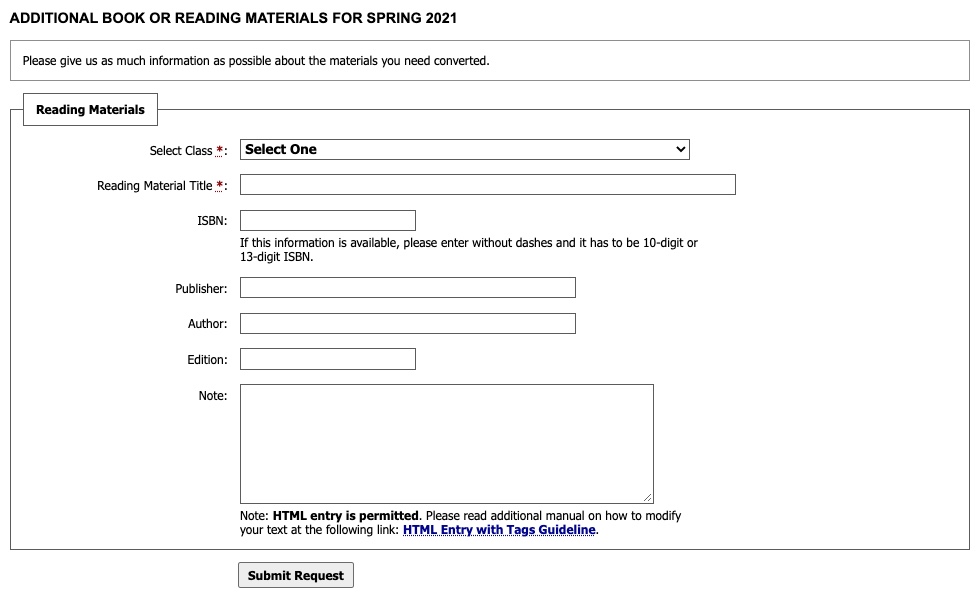
SA Tech will share a cloud folder with you where you can drop the materials. Email satech@vanderbilt.edu with any questions.