>
Facilities - Environmental Health and Safety

EHS Assist

Section Contents

What is EHS Assist?

EHS Assist (EHSA) is a user-friendly, comprehensive, online information management system that assists VU researchers with managing their safety and compliance responsibilities and information related to the use of hazardous research materials and equipment.

The EHS Assist system:

  • reduces administrative and management burden
  • improves efficiency
  • improves data accuracy
  • increases data transparency

EHS Assist provides one portal for researchers to manage chemical, radiation, X-ray, laser, and biological safety information as well as the following:

  • Access safety data sheets (SDSs);
  • Update the users, locations, and inventories of hazardous research materials such as chemicals;
  • Track research safety training completion data updated daily from Vanderbilt's Learning Hub;
  • Order radioactive materials if approved;
  • Respond to inspection findings;
  • Request hazardous waste collection services and supplies.
Image

How to...

Access EHS Assist

EHS Assist Link:  http://ehsa.vanderbilt.edu

Sign In Information

•  For VU individuals, sign in through Vanderbilt’s SSO page.

•  For VUMC individuals, sign in with your VUMC email to be taken to VUMC’s SSO page.

•  For new researchers who need access to EHS Assist or help adding a lab’s inventory, please contact ehsa@vanderbilt.edu.

•  For existing researchers who need to add, edit, or remove existing lab members, access the User Registration Guide.
EHS Assist Guides

FAQs

  • The first time I log into EHS Assist, I only see Waste Requests and Waste Supplies. How do I gain access to the other functions of EHS Assist?

    Reach out to the EHS Assist Administrator at ehsa@vanderbilt.edu for help accessing EHS Assist and any information related to your lab.

  • How do I set up my lab’s chemical inventory for the first time?

    EHS recommends that the first time a PI’s chemical inventory needs to be added to EHS Assist, you should reach out to ehsa@vanderbilt.edu for assistance. Once the inventory has been loaded successfully into EHS Assist, moving forward, you can use the chemical inventory template to make changes to the existing inventory.

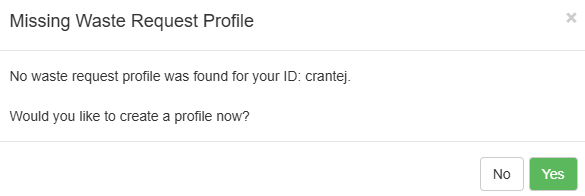
  • When placing a waste collection request, EHS Assist is asking me to create a waste profile. What do I do?

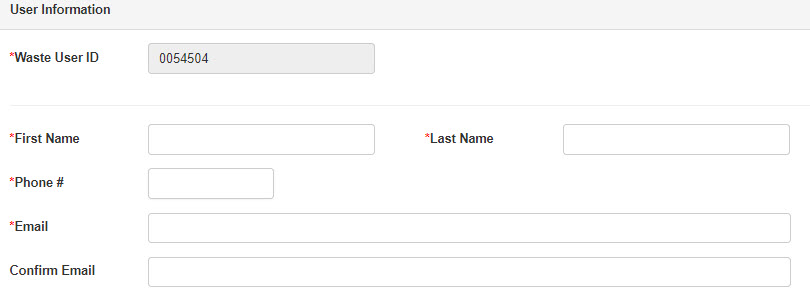
    After logging in, the first time you try to place a waste collection request in EHSA, you will be asked to add required fields to set up your Waste Request Profile.

    1. Click Yes to continue filling out the Waste Request Profile.

    2. Fill out the required fields (*) under the User Information section.

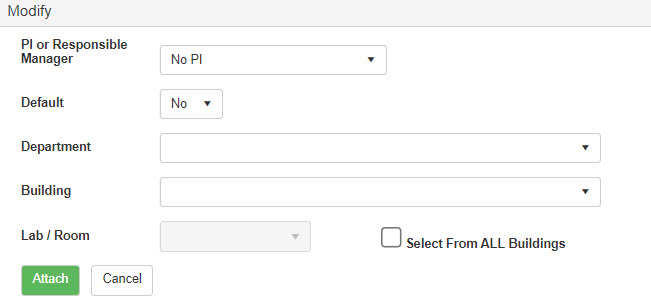
    3. Under the Waste Request Information section, this is the list of PIs that you want to request waste collection requests for.

    a. If there isn’t anyone listed, click the Add button. This will bring up the Modify window.

    b. Fill out this information and click Attach to add the PI.

    4. Repeat this step until all of the PIs that you want are listed.
    5. Click Save to save your Waste Request Profile.

  • How can I reorder the columns in EHS Assist and save that format for later?
    1. While working in EHS Assist, reorder the columns how you would like them to remain.
    2. Click the EHSA button in the top left of the page to navigate to EHS Assist's homepage.
    3. In the upper right of the home page, you will see your name located in a dropdown menu.
    4. Click the dropdown and select the Save Settings option.

    Now every time you log into EHS Assist, your columns will remain in the new order.

  • How do I transfer or move the chemicals in the inventory?

    For guidance on updating a chemical inventory, refer to the Chemical Inventory Guide, on How to Transfer/Move Chemical Inventory (pg. 29).

  • What do I do if I can’t access EHS Assist or can’t access information about the lab I currently work in?

    Reach out to the EHSA Administrator at ehsa@vanderbilt.edu for help accessing EHS Assist and any information related to your lab.

  • During inventory verification, can I edit the location or sub location of a chemical without having to leave the verification process?

    When verifying your inventory, whether manually or with a scanner, each chemical will display a ‘View/Edit’ button on it. When you click the View/Edit button, it will allow you to update a few details of the chemical without leaving the entire verification process.

  • What do I do if I receive an internal server error?

    Contact the EHSA Administrator ehsa@vanderbilt.edu and explain what module you were in, and which process you were doing while in RSA. Depending on the process and module, if any data was lost during the process, there will be a possibility of retrieving and restoring the lost data.

  • What internet browsers can I use with EHS Assist?

    Currently, Google Chrome, Firefox, and Microsoft Edge are fully supported browsers for EHS Assist. Internet Explorer is not supported.

  • Can I use EHS Assist on a mobile device?